LifeAfter: Reborn Day Survival, Immersed.
LifeAfter: Rebirth Day
Prologue | Rebirth After the Apocalypse
Q&A & Pre-download Rewards Overview
Pre-download Rewards Preview
Before April 17
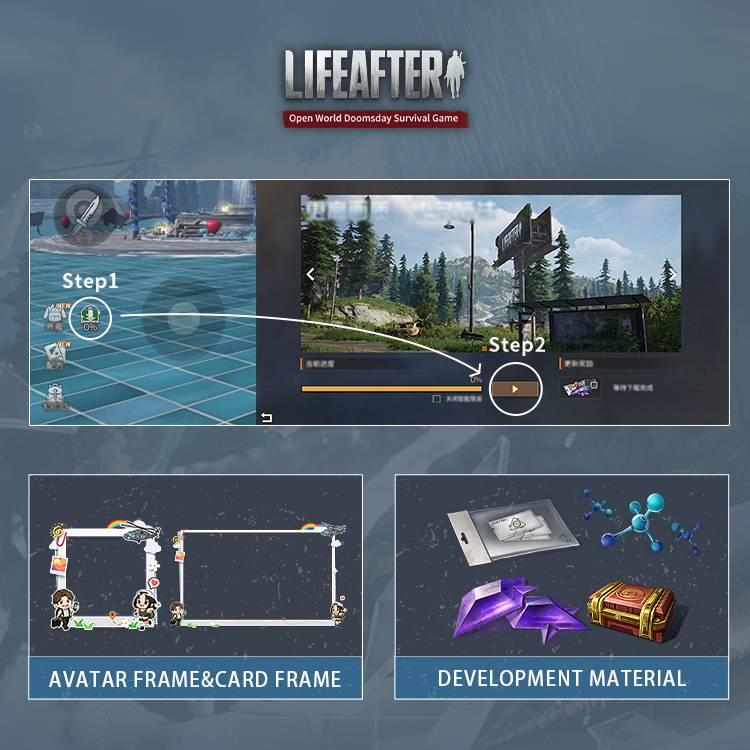
Survivors who pre-download on mobile platforms will be eligible to claim multiple rewards
Rebirth Day Client Download FAQ
Art Update Countdown Begins
Rebirth Day Client Download FAQ is now compiled!
Covers download guides, configuration performance, and common questions.
Helping Survivors quickly grasp the Rebirth Day version.
I. Pre-download and Installation Guide
Q1: After finishing the pre-download and installation, can I jump right into playing the Rebirth Day version?
A: The LifeAfter: Rebirth Day version officially launches on April 16. Survivors who complete the "pre-download" in advance can wait for the update to go live. The pre-downloaded resources will then be converted into update resources, allowing you to download a smaller update on the day and be among the first to experience the Wasteland Rebirth.
Q2: How much storage space is needed for the pre-download? What if I get an installation failure or parsing package error prompt?
A: The pre-download client is approximately 18G on mobile and 60G on PC. The download does not involve installation but will occupy additional storage space on your device. It can be paused automatically mid-process. Interruptions due to going offline or insufficient storage space allow you to resume the download from your progress. Regardless of how much progress is made, you will have correspondingly fewer resources to update on April 16.
Q3: Why is LifeAfter's client getting bigger and bigger? Storage space is really tight.
A: Past updates have accumulated some redundant resources, causing the client size to increase gradually. However, during the Rebirth Day version update on April 16, we will merge and delete past resources along with the pre-downloaded ones.
Q4: I'm a new user, how do I download the client? / I'm a Return user, how do I handle the update prompt? / I'm an active user, how do I download the latest client?
A:
(1) If you have never downloaded or are re-downloading the LifeAfter client:
You can enter the Store to download the latest package. After entering the game, download some necessary update resources for the day, and you will be able to access the login interface to start playing, initiating the "play while downloading" gameplay process.
(2) If you have already downloaded the LifeAfter package:
If you have not completed the package replacement, logging into the game will directly take you to the update interface. Follow the prompts to click, which will guide you to the corresponding Store to download the latest package.
If you have already completed the package replacement, the size of the update resources will be determined based on the pre-downloaded content. Once the update is complete, you can enter the game.
Download Notes:
1. Package replacement and pre-download are independent:
If you have completed the pre-download but have not replaced the new package, when [overwriting the installation] of the new package, you only need to download the supplementary content to start playing. That is, if you complete the pre-download before the April 16th update, you can quickly update the package after the version goes live~
2. If you have not replaced the package, have not pre-downloaded, or have not opened LifeAfter for a long time:
It will be faster to directly delete the original package and go to the app store to download the latest package! You can also "play while downloading," allowing you to explore the Refashioned wasteland world more quickly.
3. Downloader description:
Due to the large amount of update resources for the rebirth client, it is recommended that Survivors download in a WiFi environment!
II. Configuration and Performance
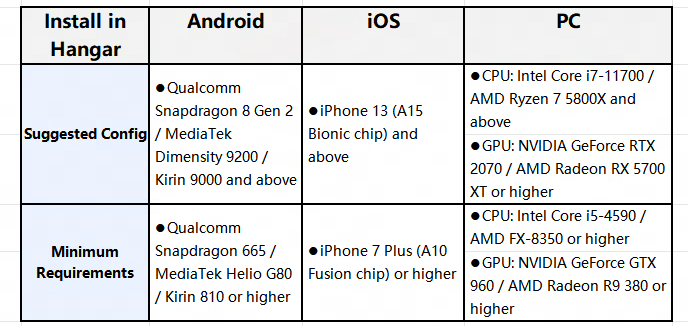
Q: The graphics quality improvement is so significant. What kind of configuration is needed to play?
A: The supported devices and facilities are as follows:
III. Update Content & Operational Experience
Q1: What are the main contents of this update's Refashion?
A: The content refashioned for the Rebirth client primarily includes improvements to NPC model precision, lighting and shadow rendering in map scenes, the player's model remodeling, monster material upgrades, and scene detail reconstruction. The goal is to confirm Survivors to immerse themselves in more nuanced lighting and shadows, more vivid landscapes, and a more authentic visual experience every moment when step into the wasteland world.
Q2: I'm used to the old interface. Can I switch the UI back myself?
A: Due to limitations in the underlying client size and considering the future development and expansion of more new interface features, the current version cannot support a one-click switch back to the old interface from before the Art Update.
But, we deeply understand how precious the "muscle memory" Survivors have honed over years in the wasteland is. Therefore, to ensure operational feel, we have retained the following:
Core controls support switching to the old style: In the Setting, you can individually switch the most frequently used core controls (e.g., the weapon-switching bar, chat window, etc.) back to the old version style.
Highly free layout customization: The new interface still offers the deep Interface Customization function. Survivors can completely follow past personal habits, freely drag, drop, and scale the positions of various UI buttons and functional areas.
Continuous Listening and Optimization: After the new version goes live, the Team will closely monitor everyone's actual usage feedback and opinions on the new interface. We are committed to conducting multiple rounds of targeted refinements and optimizations. Together with all Survivors, we will fine-tune the most intuitive and user-friendly Survival operation experience!
Q3: My character's facial features look a bit different from before. Will there be a free chance to re-customize my appearance after the update?
A: In the LifeAfter: Rebirth version, we have comprehensively upgraded the character customization system. Both the original Classic and Newborn face types may have undergone minor adjustments. After the version update, the first time Survivors edit a saved appearance slot, the cost of 1 Credit/Facelift Card will be waived. This also applies to appearances associated with brand and Collection outfits. Additionally, a Facelift Card rewards will be sent to every Survivor. This ensures everyone can enjoy a character customization experience with greater freedom and more diverse styles.
IV. Account Data Related Questions
Q1: After the art update, will all my account data (outfits, weapons, camp) still be there?
A: Everything will remain intact, not a single piece of Wood will be missing! Simply log in to the new client using your original account. Your character level, Backpack items, friend list, and current camp will be 100% fully carried over!
Q2: I'm a returning player. What should I do if I've forgotten my old account password?
A: Survivors can click on the [Recover] channel in the right-side menu bar on the game login screen. Use methods like "Character Recovery / Phone Recovery / Order Recovery /Email Recovery " to query the channel and information associated with the lost account. For more account recovery methods, Please check the official website or contact us via Discord:?https://discord.gg/lifeafter